Deployment10 min read
From PythonAnywhere to Vercel and Supabase with a Django app, step by step
How I moved Mi Jornada (Django + Vue) to Vercel and Supabase, with every error I hit along the way (a UTF-16 requirements file, a 500 on first boot, exhausted connections, Gmail rejecting the password) and how I fixed each one.
On this page
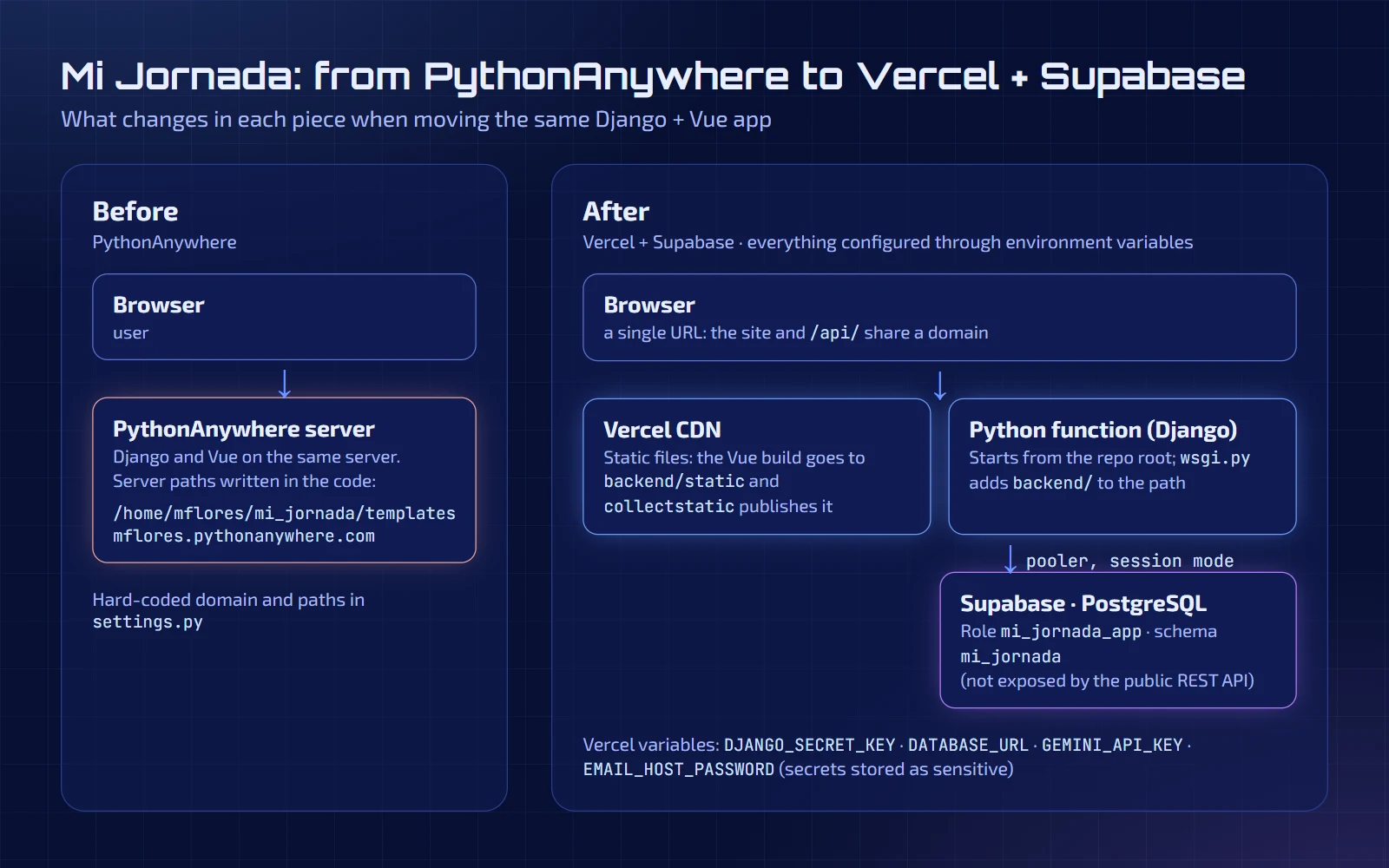
Mi Jornada is an app for logging work shifts, built with Django and Django REST Framework on the backend and Vue on the frontend. It ran on PythonAnywhere, but I wanted to move it to Vercel with a PostgreSQL database on Supabase: a URL per branch to test changes, automatic deploys on merge, and a real database instead of a SQLite file.
It looked like a change of hosting. In practice it was almost a week of errors, each with a different cause. I tell them in the order they showed up, with what I saw on screen and how I fixed it, in case you run into one of them.
1. The first deploy didn't even start: requirements.txt in UTF-16
The repository was already connected to Vercel, and the first production deploy failed in three seconds, before installing anything. The build log said:
Failed to parse "requirements.txt". File content:
��a s g i r e f = = 3 . 1 1 . 1
 D j a n g o = = 6 . 0 . 5
...
Error: could not parse requirements.txt: Unexpected '�', expected '-c',
'-e', '-r' or the start of a requirement at /vercel/path0/requirements.txt:1:1The spaces between every letter and the odd character at the start give it away: the file was saved as UTF-16. That is what happens on Windows when you generate it with a PowerShell redirect (pip freeze > requirements.txt). pip reads it without complaint, but Vercel's Python installer doesn't.
Fix: save the file as UTF-8. I converted it in the same commit where I prepared the database, and from then on Git stops showing the file as binary. It is worth remembering: everything works on the desktop and fails only on the server.
2. Django was written for a different server
With requirements fixed, the build passed, but compiling doesn't mean it works. Reading settings.py, I found three things that would fail as soon as the app ran on Vercel:
ALLOWED_HOSTSonly acceptedlocalhostand*.pythonanywhere.com, and withDEBUG = FalseDjango answers 400 Bad Request to any other domain. The same goes forCSRF_TRUSTED_ORIGINS: login would have failed.TEMPLATESpointed to an absolute PythonAnywhere path:/home/mflores/mi_jornada/templates. That path doesn't exist on Vercel, so the main page would give "template not found".- SQLite is not an option: a Vercel function's filesystem is read-only and discarded between runs. You need an external database.
Fix: take everything that depended on the server out of the code and move it to environment variables and repository-relative paths:
# Vercel sets VERCEL=1 both at build time and at runtime
ON_VERCEL = bool(os.environ.get("VERCEL"))

SECRET_KEY = os.environ.get("DJANGO_SECRET_KEY")
if not SECRET_KEY:
    if ON_VERCEL:
        raise RuntimeError("Missing environment variable DJANGO_SECRET_KEY")
    SECRET_KEY = "development-only-key"

DEBUG = os.environ.get("DJANGO_DEBUG") == "1"

ALLOWED_HOSTS = [
    "localhost", "127.0.0.1", ".vercel.app",
    *filter(None, os.environ.get("DJANGO_ALLOWED_HOSTS", "").split(",")),
]

if ON_VERCEL:
    # Vercel terminates HTTPS and forwards the request to the function
    SECURE_PROXY_SSL_HEADER = ("HTTP_X_FORWARDED_PROTO", "https")
    SESSION_COOKIE_SECURE = True
CSRF_COOKIE_SECURE = TrueTwo decisions worth making. First: on Vercel the SECRET_KEY is mandatory, and if it is missing the app doesn't start. I prefer a clear error at deploy time over a development key quietly running in production. Second: DEBUG is now off by default and only turned on with DJANGO_DEBUG=1 locally.
3. The first 500: Python starts from a different folder
With the configuration fixed, the preview answered… with a 500. The reason: my project keeps its code inside backend/, but on Vercel the process starts at the repository root, not in backend/, so Python can't find mi_jornada.settings.
Fix: add backend/ to the path at the top of wsgi.py:
import sys
from pathlib import Path

# On Vercel the process starts at the repo root, not in backend/
sys.path.insert(0, str(Path(__file__).resolve().parent.parent))After that, the basic route checks came out as expected: the main page and static files returned 200, /admin/login/ returned 200, and /api/registros/ without a session returned 403.
4. One domain for the site and the API
On PythonAnywhere the frontend called the API through an absolute URL. On Vercel it is simpler if the site and the API share a domain, so there is no CORS or cross-origin cookie setup. I made three changes:
- The frontend's API moved to
/api/on the same domain. In development, Vite forwards/apitorunserver. - The Vue build is written straight to
backend/static/andtemplates/index.html, and committed to the repository. Vercel runscollectstaticon its own (becauseSTATIC_ROOTis defined) and serves the files from its CDN. - The
frontend/distfolder, no longer used, was deleted.
The cost: after touching the frontend you have to remember to run npm run build before committing, because Vercel doesn't build Vue. For a project this size I prefer it to adding an extra build step.
5. The database: Supabase without touching the master password
My Supabase project already had an empty PostgreSQL. In Django, migrations create the tables, so you don't create them by hand; what you do have to decide is how the app connects. I made three decisions:
- A dedicated database user for the app (
mi_jornada_app) instead of the project's master password. The random password is generated locally and Supabase only receives its hash, so it never appears anywhere. - A dedicated schema (
mi_jornada) instead ofpublic. Supabase's REST API exposes thepublicschema by default; putting Django's tables in another keeps them out of its reach. The 13 tables (users, sessions, admin and the app's own) can't be read through the public API, and Supabase's security advisor flagged nothing. - Connection through the pooler in session mode, not the direct one. Supabase's direct connection only works over IPv6, and Vercel can't use it. The pooler (
aws-0-eu-west-2.pooler.supabase.com) can.
The connection is configured with a single variable, and without it the app uses SQLite locally:
DATABASES = {
    "default": dj_database_url.config(
        default=f"sqlite:///{BASE_DIR / 'db.sqlite3'}",
        conn_max_age=0,
        conn_health_checks=True,
        ssl_require=bool(os.environ.get("DATABASE_URL")),
    )
}(That conn_max_age=0 deserves its own section, further down.) Another detail: migrations are not run at deploy time. I run them from my own computer with DATABASE_URL pointing at production:
$env:DATABASE_URL = "<the string stored in .env.local>"
python manage.py migrate
python manage.py createsuperuserThe connection string lives only in a Git-ignored .env.local and in Vercel variables marked sensitive, which can't be read again once saved. Also, the app's login asks for an email, so the superuser needs one.
6. Protected previews and a public production
Vercel protects preview deployments with its own login (SSO), and that's fine: I don't want just anyone seeing a half-finished branch. But that protection was also enabled on production, so anyone opening the public URL saw Vercel's sign-in screen instead of my app. I limited it to previews; production stayed open. It is one of those settings that break nothing and, if you don't check them, leave you with a site that "works" but nobody can open.
7. Password recovery: an old bug and a 535 error
While migrating, I added the password-recovery email (the "Forgot your password?" button did nothing). Two different problems appeared.
A bug that already existed. In models.py, the method that checks whether the link is still valid used datetime.timezone instead of django.utils.timezone, so confirming any link gave a 500, every time. It had never worked; nobody had simply reached that step. A one-line import change fixed it:
from datetime import datetime, timedelta   # no timezone here
from django.utils import timezone # Django's ownGmail rejected the password. With sending configured over SMTP, delivery failed with 535 Username and Password not accepted. The connection, TLS and username were right; authentication was failing. My first suspicion was that the app password had been saved with spaces, so I saved it again without them, and nothing changed. To find out whether the password or what was stored in Vercel was at fault, I tested it directly against Gmail from my computer, without going through the app:
python -c "import smtplib,getpass; s=smtplib.SMTP('smtp.gmail.com',587); s.starttls(); s.login('my-account@gmail.com', getpass.getpass('Password: ').replace(' ','')); print('OK')"The password I had generated wasn't valid. I generated a new one, confirmed that test printed OK, saved it in Vercel without spaces and deployed again. That last step is easy to forget: new environment variables only apply from a new deployment. Changing the variable doesn't change what is already running; you have to run vercel redeploy. Since then the email arrives.
8. Exhausted connections: EMAXCONNSESSION
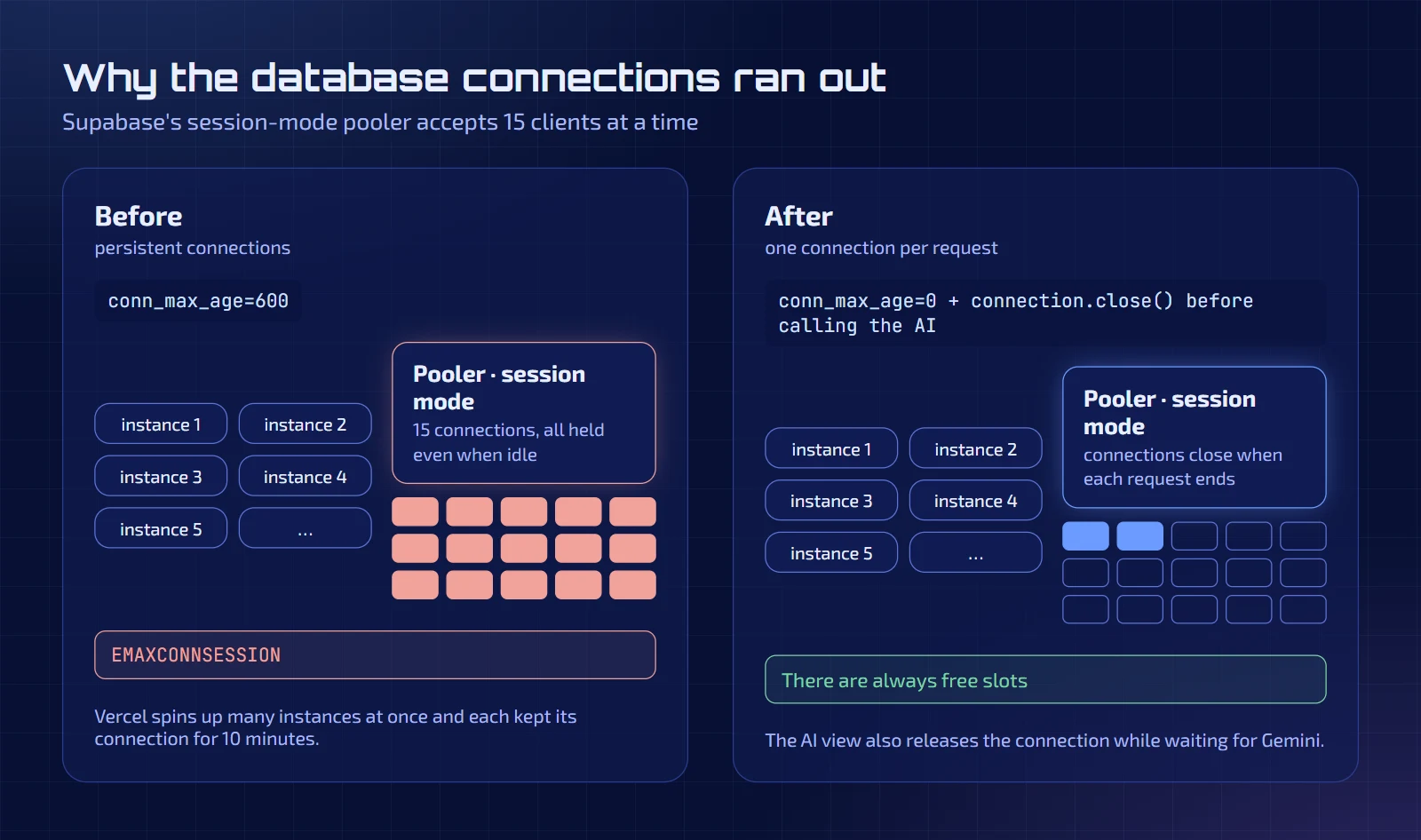
This was the most interesting error, because it didn't show up in the first tests but later, in production, with the AI assistant running. In Vercel's logs I saw EMAXCONNSESSION: Supabase's session-mode pooler only accepts 15 clients at a time, and the app was using them all up.
The cause was a configuration line that is good practice on a traditional server: conn_max_age=600, which keeps the connection open for ten minutes so it can be reused. But on Vercel there isn't one process, but many function instances that appear and disappear, and each one held on to its database connection for ten minutes even while idle. With just a few instances, the pooler fills up.
Fix in two steps:
conn_max_age=0: the connection is closed when each request ends.- In the AI assistant's view, which can spend several seconds waiting for Gemini, I close the connection before calling the model, so it isn't held while I'm not using it:
# Release the database connection while the AI answers (it can take a while)
connection.close()

try:
resultado = ia.interpretar(texto, hoy, lugares)Each request pays the cost of opening its connection, but for an app this size that is a reasonable price for never running out. For an app with a lot of traffic you would look at the pooler in transaction mode, which accepts many more clients (with its own caveats in Django, such as disabling server-side cursors).
9. When the free AI gets saturated
The assistant uses the free tier of the Gemini API, and now and then the model answers with a high-demand 503. Instead of showing an error, the request tries other free fallback models if it gets a 429 or a 5xx. It is the same idea I describe in another article about the portfolio's AI, applied here to logging shifts by typing in natural language.
10. The demo account that took 30 seconds
So that anyone can try the app without signing up, I created a demo account with about five weeks of fictional entries that regenerate themselves when it has been unused for more than an hour. The first login in production took more than 30 seconds.
The code created the entries one by one, around thirty, and every query travels from Vercel to the Supabase database, which is in London. Thirty round trips add up. The fix was to compute the entries in memory and save them in one go with bulk_create:
registros = []
# ... the Registro objects are built in memory, computing duration and amount ...
# A single query: the database is far from Vercel's functions
Registro.objects.bulk_create(registros)With that, each regeneration went from 44 queries to 11. One detail I almost missed: bulk_create doesn't call save(), so the duration and amount calculation, which the model's save() used to do, has to be run by hand before inserting. I covered it with a test that checks the amounts come out right.
The result
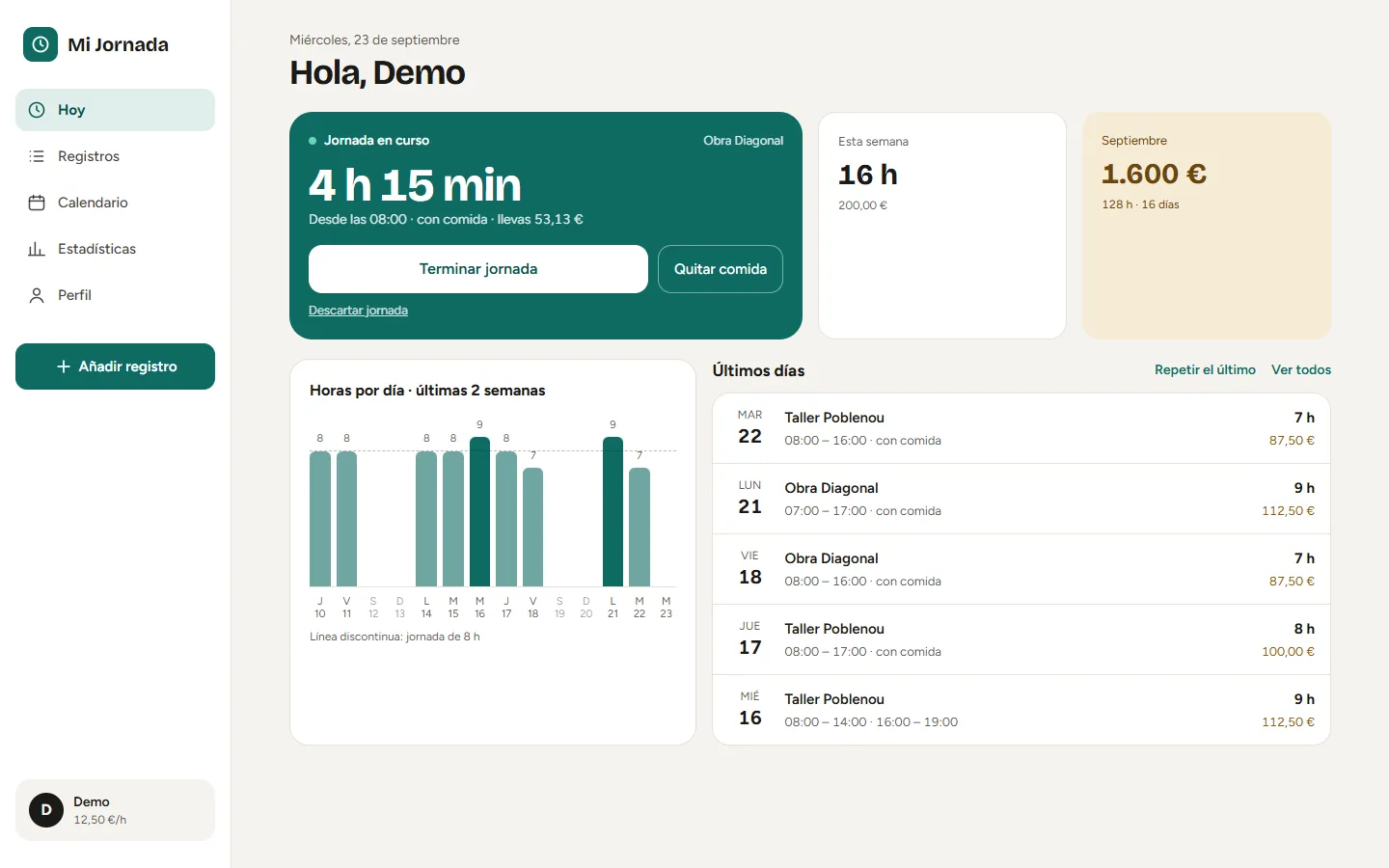
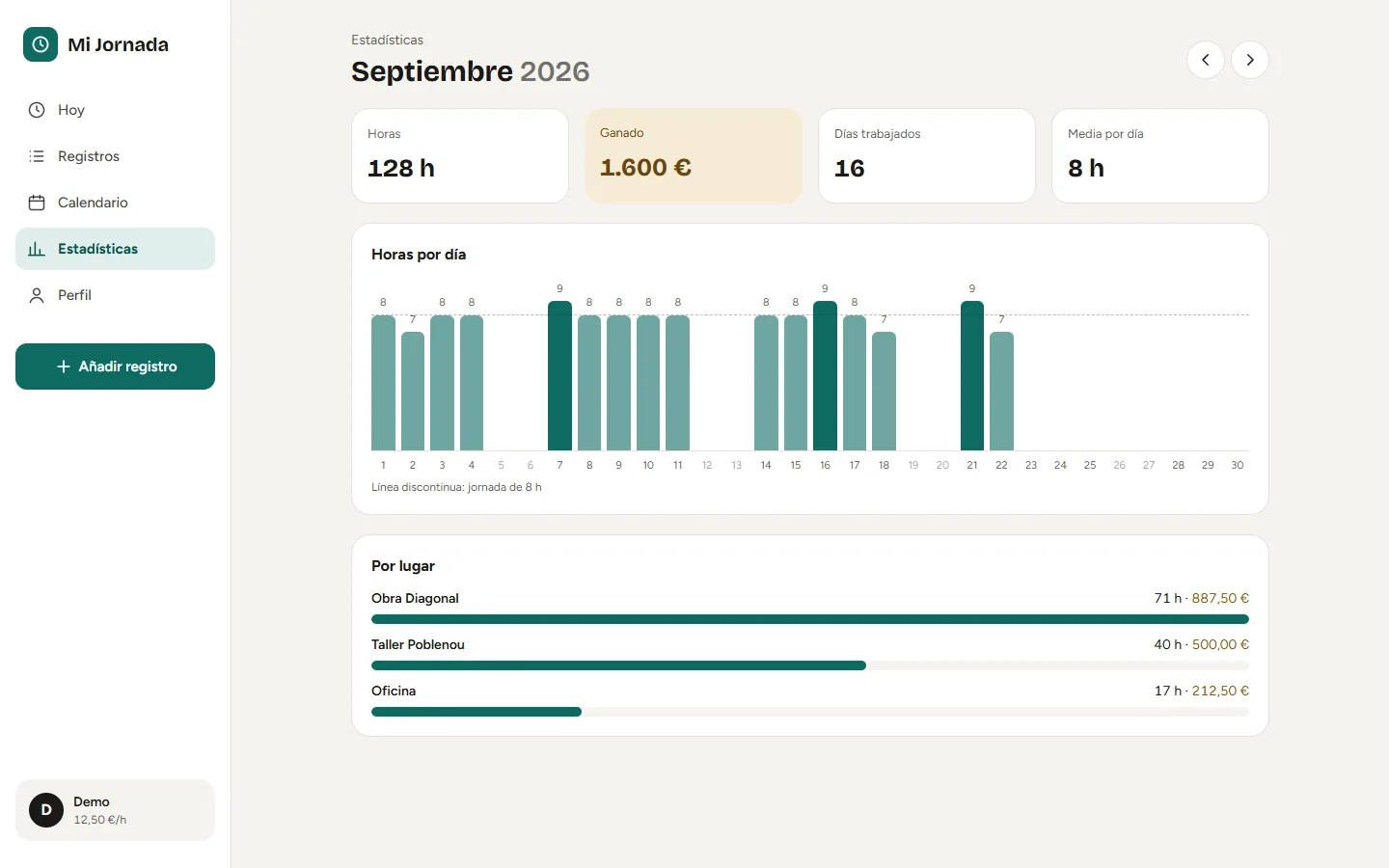
The app runs in production with the database on Supabase, recovery emails arrive, and the demo opens in one click from the portfolio. Measured end to end, the "View demo" path from the portfolio to having the dashboard in front of me, including a cold start right after a deploy, took about ten seconds.
What I would do from day one
- Test an empty deploy before migrating anything. I would have found errors 1, 2 and 3 on day one with a minimal app.
- Zero absolute paths and zero domains written into the code. Anything that changes from one server to another goes into environment variables.
- Think in functions, not processes. Anything that assumes "a server that lasts" (persistent connections, local files, in-memory state) breaks on Vercel.
- Remember to redeploy after changing variables.
- Check the region. Vercel's build log said it ran in Washington (
iad1) and my database is in London. I haven't checked which region the functions run in; it is the first thing I would look at to cut the latency of every query.
You can see it running in the demo (it logs in with the test account on its own) and the code on GitHub.
Related projects
- In production · 2026
Mi Jornada
Web app to log working days and always know how many hours have been worked and how much money has been earned.
- Python
- Django
- Django REST Framework
- REST APIs
- +11